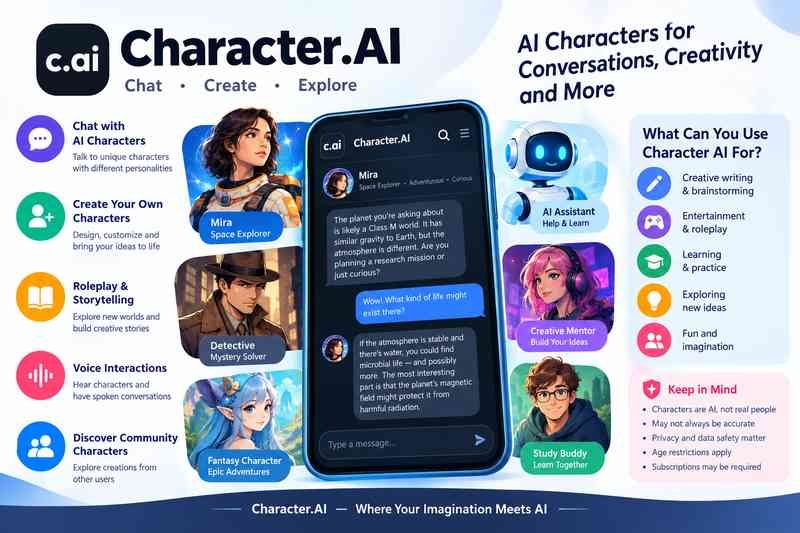
Character AI, officially written as Character.AI, is an artificial intelligence platform that lets users interact with AI powered characters through conversations, roleplay, storytelling, and creative scenarios. Instead of answering every question like a traditional AI assistant, these characters are designed to adopt particular personalities, communication styles, and fictional roles.
You can chat with a fictional detective, create an original fantasy character, practice a conversation, develop a story, or explore an imaginary world. The experience feels more like talking to a character than using a conventional search engine.
However, Character AI is more than a chatbot playground. Its conversational nature raises practical questions about accuracy, privacy, emotional attachment, subscriptions, and age restrictions. Those details matter if you are deciding whether to use the platform yourself or allow someone younger to access it.
What Is Character AI?
Character AI is an interactive AI entertainment platform built around conversations with virtual characters. Users can discover characters created by other people or design their own with specific personalities, backgrounds, instructions, and conversational styles.
According to the platform’s official Safety Center, its intended uses include writing stories, roleplaying with original characters, and exploring imaginative scenarios.
Unlike a traditional search engine, which primarily helps you find information published elsewhere, Character AI generates responses within a conversation. A character might speak like a fictional detective, act as a fantasy game companion, or help you develop dialogue for a novel.
The important distinction is that a character’s personality is simulated by AI. Even when a conversation feels personal or emotionally convincing, the character is not a human being with independent feelings, experiences, or intentions.
How Does Character AI Work?
Character AI uses large language models to generate responses based on the conversation and the character’s configuration. These models learn patterns in language and use those patterns to produce text that fits the context.
The process is easier to understand through a simple example.
Imagine creating a character called Mira, a fictional space explorer who speaks confidently and enjoys solving mysteries.
- You define Mira’s background, personality, and speaking style.
- You start a conversation by asking about an unexplored planet.
- The AI generates a response that reflects Mira’s assigned role.
- You continue asking questions, and the conversation develops based on the available context and the model’s output.
The AI is not actually exploring space or remembering a real life as Mira. It is generating a response that fits the role and conversation.
Why characters can feel realistic
Several elements contribute to the experience:
- Character instructions: These help shape the character’s personality, behavior, and style.
- Conversation context: Previous messages can influence later replies.
- Natural language generation: The model produces conversational text instead of relying only on fixed, prewritten responses.
- Roleplay consistency: The model attempts to maintain the character’s identity and the situation established in the conversation.
These mechanisms can make interactions immersive, but they do not guarantee consistent behavior. A character may contradict an earlier statement, forget a detail, or respond in a way that breaks the roleplay.
Main Features of Character AI
Character AI combines character discovery, conversation, and creative tools. The exact features available may change as the platform develops.

- Chat with AI characters
Explore characters with different personalities, fictional backgrounds, and conversational styles. Depending on the character, a chat can resemble a casual conversation, a fictional scene, a game, or a structured learning exercise.
- Create your own characters
Design original characters by specifying details such as a name, description, personality, and greeting. More deliberate character instructions can help produce a more consistent experience, although the AI may still behave unpredictably.

- Roleplay and interactive storytelling
Build fictional scenes, explore alternate storylines, and collaborate with a character on dialogue or plot development. This is useful for entertainment and creative writing because the story can evolve in response to your prompts.

- Voice interactions
Character.AI has offered voice features that let users hear character voices and participate in spoken conversations. Its official Character Calls and Voice FAQ explains how these features work. Availability and access can change, so check the current app for specific options.

- Discover community created characters
Explore characters designed by other users. This offers variety, but character quality, accuracy, and suitability can differ considerably because community created content is not uniformly reliable.
What Can You Use Character AI For?
The best use depends on what you want from a conversational AI. Character AI is particularly suited to interactive experiences rather than tasks that require verified information.
Creative writing and brainstorming
Writers can use characters to test dialogue, develop fictional personalities, explore conflicts, and generate alternative story directions.
For example, you could ask a fictional detective to interrogate a suspect in a mystery story. The exchange might reveal new ideas for dialogue or plot twists.
Treat the result as creative material, not as a finished story that needs no editing.
Entertainment and roleplay
Users can participate in fantasy adventures, science fiction scenarios, fictional friendships, and other imaginative conversations. Because the character responds to your messages, the experience can feel more interactive than reading a fixed story.
The main limitation is consistency. The AI may forget established rules or introduce details that do not fit the story.
Language practice
Conversational characters can provide a low pressure way to practice everyday dialogue, try different conversation scenarios, or explore vocabulary.
However, generated responses may contain grammatical errors or unnatural expressions. If you are learning a language for school, work, or an examination, verify important corrections with a dependable language resource or qualified instructor.
Practicing conversations
A character can simulate a job interview, a customer service exchange, or a difficult conversation. You can rehearse possible answers and try different approaches.
This can help with preparation, but the simulation cannot reliably predict how a real person will respond.
Learning through conversation
You might create a character who explains a historical event or plays the role of a fictional science tutor. This can make a topic more engaging, especially when you want to ask follow up questions.
Still, Character AI should not be your sole source for factual learning. A confident sounding character can generate inaccurate dates, explanations, or references.
How to Use Character AI
If you want to try the platform, the basic process is straightforward.
- Visit the official website or app. Start at Character.AI rather than an unfamiliar website claiming to offer the service.
- Complete the required account and age checks. Follow the current sign up and age assurance instructions presented by the platform.
- Explore available characters. Search for a topic, fictional role, or type of conversation that interests you.
- Start with a clear message. Explain what you want to do, what role the character should play, and any relevant context.
- Guide the conversation. If the character misunderstands you, clarify the request or restate the scenario.
- Review the result. For creative work, check whether the response fits your story. For factual questions, verify the information independently.
How to get better responses
A specific prompt usually provides better direction than a vague one.
For example:
Vague prompt: “Help me write a story.”
More useful prompt: “Act as a science fiction writing partner. Help me develop a short mystery set on a research station on Mars. Ask me one question at a time about the plot, and keep the tone suspenseful without writing the entire story for me.”
The second prompt defines the role, setting, tone, and interaction style. It gives the model clearer guidance without guaranteeing that every response will follow the instructions.
Can You Create Your Own Character on Character AI?
Yes. Character creation is one of the platform’s defining features. It allows users to shape how an AI character presents itself and responds during a conversation.
The exact creation interface may change, but the following elements are useful when designing a character.
| Element | Purpose |
| Name | Identifies the character |
| Short description | Summarizes the character’s role |
| Greeting | Establishes the opening message and situation |
| Personality instructions | Guides behavior, tone, and preferences |
| Background or scenario | Provides context for the conversation |
| Visibility settings | Determine whether the character is private or available to others, where supported |
Tips for designing a stronger character
Give the character a clear purpose. A character designed to help brainstorm mysteries needs different instructions from one intended to simulate a friendly conversation.
Use specific personality traits. Instead of saying the character is simply interesting, describe how it communicates. It might be curious, concise, skeptical, formal, or playful.
Include relevant boundaries. State what the character should avoid, what tone it should maintain, and how it should respond when it lacks information.
Test the character with different prompts. A convincing introduction does not prove that the character will remain consistent across a long conversation. Try ordinary questions, unexpected situations, and prompts that test its core personality.
If you create a character based on an existing fictional person or a real individual, consider intellectual property, impersonation, and privacy implications before making it public.
Is Character AI Free?
Character AI has offered free access alongside a paid subscription called c.ai+. However, current subscription terms, prices, benefits, and feature availability should be checked directly because they can change.
The distinction between free and paid access is generally about the experience and available benefits, not a guarantee that paid responses will always be accurate.
| Access type | What to consider |
| Free access | A way to explore supported character conversations without purchasing a subscription |
| c.ai+ | A paid tier that may offer additional benefits, depending on the current plan |
| Voice and other tools | Availability may depend on the feature, account, and current platform rules |
Check the official Character.AI website for current subscription details before paying.
Is c.ai+ worth it? It depends on your usage. If you only want occasional creative conversations, free access may be sufficient. If you use the service frequently and the current paid benefits address a specific need, compare those benefits with the recurring cost.
Do not subscribe based only on claims that a paid plan will make characters more intelligent or eliminate incorrect responses.
Is Character AI Safe?
Character AI has introduced moderation systems and safety measures, but safety is not an all or nothing property. The relevant question is what risks remain for a particular user and use case.
The platform’s Safety Center describes its approach to content moderation, reporting, and user safety. Its September 2026 safety update also discusses continuing work on safeguards.
These measures are relevant, but company descriptions of safety systems are not a guarantee that every conversation will be appropriate or harmless.
Age restrictions and the under 18 experience
Character.AI has made substantial changes to how younger users access the platform.
In its October 2025 announcement, the company said it would remove open ended character chat for users under 18. Its subsequent official age assurance guidance, updated July 17, 2026, states that all users must complete an age assurance check. Users verified as 18 or older retain access to character chat, while users verified as under 18 are placed in an experience that includes reading mode and does not permit chat with characters. Source: Character.AI Help Center
That means older descriptions of unrestricted teen chatting, or advice based on the platform’s previous age rules, may no longer be accurate. Check the current official policy if eligibility is important to you.
Can conversations become emotionally intense?
Yes. An AI character can respond with affectionate, supportive, or highly personal language. This may make an interaction feel meaningful, especially when the user returns to the same character repeatedly.
The distinction to remember is that a convincing emotional response is not proof of human understanding or genuine feelings.
For a balanced experience, it is sensible to treat the platform as entertainment or a creative tool rather than a replacement for relationships with real people. If a conversation makes you distressed, uncomfortable, or overly dependent on continuing it, take a break.
What about privacy?
Conversations with AI services can contain personal details, and users should not assume that a chat is equivalent to a private conversation with a trusted friend.
Character.AI’s privacy policy update, effective July 1, 2026, explains changes to its privacy disclosures. For the full picture, review the current policy and regional disclosures rather than relying on a short summary.
Practical precautions include:
- Do not share passwords, financial account details, identity documents, or security codes in character conversations.
- Avoid including private information about friends, family members, colleagues, or other people without a good reason.
- Check the platform’s current privacy settings and data practices before sharing sensitive material.
- Remember that a character’s reassuring response does not establish how the service stores or handles your information.
- Use caution with publicly visible characters, shared content, and anything you publish.
These are sensible precautions for conversational AI platforms generally, not evidence that every Character.AI conversation is exposed or misused.
What Are the Main Limitations of Character AI?
Character AI is useful for immersive conversations, but its design also creates limitations.
It can invent facts
A character may confidently generate incorrect information, fictional references, or misleading explanations. This is a common limitation of generative AI.
For example, a character playing a history professor might invent a quotation or give the wrong date for an event. Its convincing presentation does not make the information reliable.
Use authoritative sources for medical, legal, financial, academic, or other consequential decisions.
Characters may lose context
A long conversation can become inconsistent. The character may forget a name, change its personality, or contradict something established earlier.
Restating essential details can help, but it does not guarantee persistent memory. Avoid assuming that the character will remember every conversation or instruction indefinitely.
Responses are not always predictable
The same prompt may produce different answers at different times. Model changes, conversation context, and character instructions can all influence the result.
This flexibility makes roleplay more dynamic, but it can be frustrating when you need precise, repeatable answers.
It is not a substitute for professional support
A character can simulate a supportive conversation, but it cannot reliably diagnose a health condition, provide individualized professional judgment, or take responsibility for important decisions.
If you need professional assistance, use an appropriate qualified service rather than relying on a character’s interpretation.
Character AI vs. Traditional AI Assistants
Character AI and general purpose AI assistants both generate conversational responses, but their primary goals differ.
| Comparison | Character AI | General purpose AI assistants |
| Main purpose | Character interaction, roleplay, and entertainment | Broad assistance with questions and tasks |
| Personality | Often central to the experience | Usually secondary to the task |
| Creative roleplay | A core use case | Available on many assistants, but not always the main focus |
| Factual research | Responses need independent verification | May provide research and references, depending on the tool |
| Character customization | A central platform feature | Varies by product |
| Best fit | Interactive stories and personality driven conversations | Research, productivity, explanation, and varied everyday tasks |
Neither category is automatically better. Choose according to the task.
If you want an evolving fantasy adventure with a character that has a defined personality, Character AI may fit well. If you need to compare official product specifications, analyze a document, or find reliable sources for a report, a research focused assistant may be a better starting point.
Character AI Alternatives
The right alternative depends on what you want to do. Not every chatbot offers the same balance of roleplay, privacy, factual research, and customization.
Some options to investigate include:
- Replika: An AI companion service designed around ongoing personal interactions.
- ChatGPT: A general purpose AI assistant suited to writing, explanations, brainstorming, and many practical tasks, with conversational capabilities.
- Claude: A general purpose AI assistant that can help with writing, analysis, and creative development.
- Other character focused chatbots: These may emphasize fictional personas, roleplay, customization, or companion interactions.
These services are not interchangeable, and their features, policies, age requirements, and prices differ. Review their official terms and privacy information before moving a conversation or sharing personal details.
A useful way to choose is to start with your main priority: immersive roleplay, creative writing, factual research, or a more general conversational assistant.
Frequently Asked Questions About Character AI
Is Character AI a real person?
No. Character AI generates responses using artificial intelligence. Characters may imitate human conversation and emotion, but they are not real people simply because their responses feel natural.
Can Character AI remember previous conversations?
It can use available conversation context to maintain continuity, but memory is not guaranteed to be complete or permanent. A character may forget details or behave inconsistently, particularly in longer interactions.
Can you use Character AI without creating a character?
Yes. The platform supports discovering and interacting with existing characters, so creating your own is not necessary to explore its main concept. Specific account requirements and access restrictions may apply.
Can Character AI help with writing?
Yes. It can help generate dialogue, explore character personalities, brainstorm plot ideas, and simulate scenes. You should still edit the results for quality, originality, and consistency.
Is Character AI suitable for children and teenagers?
Access depends on the platform’s current age assurance rules. As of its July 2026 guidance, users verified as under 18 cannot chat with characters and receive a restricted experience that includes reading mode. Parents and guardians should consult the official age assurance guidance and safety resources for the latest information.
Does Character AI provide accurate answers?
Not reliably enough to serve as the sole source for important facts. Its primary appeal is interactive character conversation, and it can generate inaccurate or invented information. Verify consequential claims independently.
Is Character AI the same as ChatGPT?
No. Character AI is centered on character based conversations and interactive entertainment, while ChatGPT is a general purpose assistant designed for a wider range of tasks. Both can support creative work, but their intended uses and features differ.
Final Thoughts
Character AI makes AI conversations more interactive by letting users explore fictional personalities, create characters, and build stories through dialogue. Its greatest strength is the flexibility of the experience: users can shape the conversation instead of following a fixed script.
That same flexibility has limits. Characters can invent facts, lose context, and produce emotionally convincing responses that should not be mistaken for genuine human understanding. Age restrictions and privacy practices also deserve attention, particularly for families and anyone considering sharing sensitive information.
You may also read: Software