
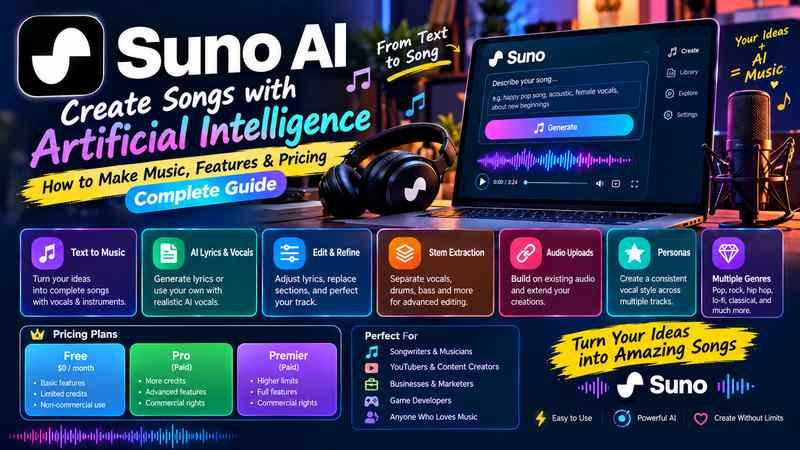
Suno AI is an AI music generator that turns written descriptions into complete songs, including vocals, lyrics, melodies, and instrumental arrangements. You can use it to create a pop song, a rock anthem, a relaxing instrumental, a hip hop track, or music for a video without needing to play an instrument or work in a traditional recording studio.
What makes Suno different from a conventional music production tool is how much of the creative process it handles for you. Instead of recording each instrument separately, you describe the sound you want, generate a track, and refine the result until it fits your idea.
However, creating a song is only part of the process. If you want to publish music commercially, edit individual elements, maintain a consistent sound across multiple tracks, or protect your creative work, there are additional details worth understanding.
This guide explains how Suno AI works, how to use its main features, what its subscription options mean, and what to consider before releasing AI generated music.
What Is Suno AI?
Suno AI is a generative artificial intelligence platform designed to create music from text prompts and other supported inputs. It can produce songs with vocals, lyrics, instrumentals, and arrangements in a wide range of musical styles.
You can access Suno through its official website at Suno.com.
Unlike a traditional digital audio workstation, such as Ableton Live or FL Studio, Suno does not require you to construct a song by arranging individual notes, recording performances, and mixing every instrument yourself. It generates an audio composition from your instructions.
For example, you could enter a prompt describing a soulful R&B song with expressive vocals, warm piano chords, a slow rhythm, and lyrics about starting over. Suno interprets that description and generates a musical result.
The output may include:
- Original song lyrics generated from your instructions.
- Vocals and instrumental accompaniment.
- Melodies, harmonies, rhythms, and musical arrangements.
- Different musical genres and production styles.
- Instrumental tracks without singing.
- Song variations that you can compare and refine.
The precise controls and output quality depend on the model and features available in your account.
The central advantage is accessibility: you can turn a musical idea into an audible draft without first learning the technical process of music production.
That makes Suno useful for beginners, songwriters, video creators, musicians, and anyone exploring new ways to make music.
How Does Suno AI Work?
Suno uses generative AI models trained to produce musical audio. When you provide a prompt, the system uses the instructions and supported inputs to generate a composition that attempts to match the requested style, mood, lyrics, and structure.
You do not need to understand the underlying machine learning to use it, but knowing the basic workflow helps you get better results.
- Describe your musical idea
Specify the genre, mood, tempo, instrumentation, vocal character, and lyrical theme. More useful details give the model a clearer creative direction.
- Generate the song
Suno creates audio based on your instructions. Depending on the available generation options, you may receive multiple versions to compare.
- Listen and refine
Evaluate the melody, vocals, lyrics, structure, and overall sound. Generate alternatives or use the available editing tools to improve specific sections.
- Export or share
Save or download your finished work when your plan and the current download rules allow it. You can then use it in a suitable production or publishing workflow.
A useful distinction is that generating a song and finishing a song are different tasks. Suno can create an impressive first draft quickly, but you may still need to revise lyrics, improve transitions, balance the mix, or edit the arrangement.
Main Features of Suno AI
Suno combines song generation with tools for developing, editing, and reusing musical ideas. The exact features available may vary by model, subscription, and product updates.
Text to music generation
Describe a genre, mood, theme, and sound, and Suno turns the description into audio. This is useful when you have an idea but no recorded instruments or musical arrangement.
AI lyrics and vocals
You can ask Suno to generate lyrics or provide your own. Vocal generation can help you explore how a lyric might sound when performed, although pronunciation and phrasing may need improvement.
Song editing and section replacement
Available editing tools can help you revise lyrics, replace portions of a track, or reshape an arrangement without necessarily regenerating the entire song.
Stem extraction
Stem tools separate a completed recording into component audio parts, such as vocals, drums, and bass. This can help you continue editing in a digital audio workstation. Separated stems may contain artifacts and are not always equivalent to original studio recordings.
Audio uploads and song extensions
Supported upload and extension workflows let you build on existing musical material. These features are particularly useful for developing a melody, continuing an unfinished idea, or exploring alternate arrangements.
Personas and musical consistency
Suno’s Persona feature lets you capture aspects of a song’s vocal character, style, and overall feel for use in later creations. It can help establish a recognizable sound across multiple tracks, although it does not guarantee identical vocals or production.
Suno has also announced changes to its models, editing capabilities, and download policies. Its official product announcements are a better place to confirm newly released features than older tutorials.
How to Use Suno AI to Create Your First Song
You can begin without musical training. The key is to give Suno a clear brief, evaluate what it produces, and improve the result rather than expecting a single prompt to deliver a perfect recording.
Step 1: Open Suno
Visit Suno.com and sign in or create an account if required.
Review the available creation options and your account’s current credit allowance. Free access and paid subscriptions may offer different limits, controls, and download permissions.
Step 2: Choose a creation method
Suno’s interface may offer different workflows depending on the available features.
- Simple creation: Start with a description of the song you want.
- Custom creation: Supply your own lyrics and more detailed musical instructions.
- Instrumental creation: Request music without vocals.
- Existing audio workflows: Use supported uploads or editing options to develop material you already have.
For a first attempt, a simple description is usually enough. You can add complexity once you understand how the system interprets your instructions.
Step 3: Write a specific prompt
A useful prompt describes the sound rather than relying on a broad genre label.
For example, instead of entering only “make a pop song,” try:
EXAMPLE SUNO PROMPT
Create an uplifting indie pop song about starting a new chapter in life. Use warm acoustic guitar, bright piano, steady live sounding drums, melodic bass, and expressive lead vocals. Begin with a restrained verse, build into a memorable chorus, and finish with a satisfying musical outro. Keep the production polished, energetic, and emotionally hopeful.
Copy prompt
This prompt gives the model a genre, theme, instrumentation, vocal direction, arrangement, and mood. Those details help establish a coherent creative target.
Step 4: Decide whether to provide lyrics
If you want Suno to write the lyrics, describe the subject and emotional direction.
If you already have lyrics, provide them in the appropriate custom lyrics field. Consider using recognizable sections such as verses, chorus, and bridge when supported by the interface.
For example:
- Verse: Introduce the situation.
- Chorus: Express the central message.
- Second verse: Develop the idea.
- Bridge: Introduce a new perspective.
- Final chorus: Reinforce the main theme.
This is a songwriting framework, not a guarantee that the generated song will follow the structure perfectly.
Step 5: Generate and compare results
Start generation and listen to the available versions.
Do not judge a song only by its opening. Listen for whether the chorus develops naturally, the lyrics remain understandable, and the arrangement supports the intended mood.
If one version has the right melody but weak lyrics, use the available editing or regeneration tools to improve that aspect.
Step 6: Refine the track
Make one meaningful change at a time. For instance, if the song sounds too energetic, revise the tempo or mood description instead of rewriting the entire prompt.
If the chorus feels weak, focus on its melodic direction, lyrical hook, or arrangement. If the ending is abrupt, use an appropriate extension or editing feature where available.
Step 7: Save your final version
When the track is ready, review the current download options and the usage rights associated with the plan under which it was created.
If you intend to publish it commercially, confirm the relevant rights before distributing it.
How to Write Better Suno AI Prompts
Prompt quality affects the direction of the generated music, but longer prompts are not automatically better. The goal is to describe the most important musical decisions clearly.
A practical prompt framework is:
| Prompt element | What to specify | Example |
| Genre | Musical category | Indie folk |
| Mood | Emotional quality | Reflective and hopeful |
| Vocals | Voice and delivery | Soft, expressive lead vocals |
| Instruments | Main sound sources | Acoustic guitar, piano, light percussion |
| Rhythm | Energy and groove | Relaxed, steady rhythm |
| Arrangement | Song progression | Intimate verse, fuller chorus |
| Lyrics | Subject and message | Finding courage after a setback |
| Production | Desired sound | Warm, spacious, natural mix |
You do not need to specify every element for every song. Prioritize the details that define your idea.
Use descriptive language
Compare these two prompts:
Vague prompt: “Make a sad song.”
More useful prompt: “Create a slow, intimate piano ballad about missing someone after a difficult goodbye, with restrained vocals, spacious piano chords, subtle strings, and a gradual emotional build.”
The second prompt gives the system several concrete directions while leaving room for creative interpretation.
Describe the sound you want
Useful musical descriptors include:
- Tempo: slow, moderate, fast, relaxed, driving.
- Mood: nostalgic, tense, joyful, melancholic, triumphant.
- Instrumentation: piano, acoustic guitar, synthesizer, strings, percussion.
- Vocal delivery: gentle, breathy, powerful, conversational, layered.
- Production: raw, intimate, polished, atmospheric, spacious.
These descriptions are more actionable than simply asking for a song that sounds “professional.”
Change one variable at a time
If you change the genre, lyrics, vocals, tempo, and instrumentation simultaneously, it becomes difficult to determine which instruction improved the result.
A more reliable approach is to keep the strongest elements of a generation and adjust one weakness. This makes experimentation more controlled and helps you learn which instructions matter most.
Avoid relying entirely on genre labels
Two songs can both be described as rock while having very different rhythms, vocal styles, and production.
If you have a specific sound in mind, explain the musical qualities behind the genre label. For example, distinguish between a heavy guitar driven arrangement and a lighter alternative rock track with clean guitars and restrained vocals.
The objective is not to write the longest prompt. It is to communicate the musical identity you want.
Suno AI Pricing and Subscription Plans
Suno has offered a free Basic tier and paid Pro and Premier subscriptions. Exact prices, credit allowances, and plan benefits can change, so confirm the current options on the official Suno website.
The main differences to evaluate are generation capacity, access to features, download allowances, and commercial usage rights.
| Plan | General purpose | Important consideration |
| Basic | Trying the platform and experimenting with song ideas | Free songs are subject to noncommercial usage restrictions |
| Pro | More frequent music creation and commercial projects | Check the current credit allowance and commercial rights |
| Premier | Higher volume creation and expanded production workflows | Confirm whether the additional capacity suits your workload |
These descriptions explain the general plan positioning, not a guarantee of every current feature or quota.
Is the free version enough?
For learning how Suno works, experimenting with genres, and creating personal musical sketches, a free plan may be sufficient.
However, free access should not be confused with unrestricted publishing rights. Suno’s published help guidance states that songs generated under its Basic plan are intended for noncommercial use.
If you plan to monetize a song, do not assume you can simply upgrade later and automatically gain commercial rights to everything you created previously.
When is a paid subscription worthwhile?
A paid subscription may make sense when you regularly generate music, need greater creative capacity, or intend to use eligible tracks in commercial projects.
Before subscribing, consider:
- How many generations you expect to create.
- Whether you need downloadable audio or editing features.
- Whether the relevant plan grants commercial usage rights for your intended work.
- Whether the plan’s current limits fit your production workflow.
- Whether you can justify the recurring cost.
Paying for a plan can provide contractual permissions, but it does not automatically guarantee that every AI generated composition qualifies for copyright protection.
Can You Use Suno AI Music Commercially?
Yes, eligible Suno songs can be used commercially when the applicable plan and terms grant those rights. However, commercial permission and copyright ownership are different questions.
Suno’s official help documentation, updated in September 2026, explains that songs created while subscribed to an eligible paid plan receive commercial use rights. These rights can allow users to monetize music through distribution services, sales, and audiovisual projects, subject to the applicable terms. Read Suno’s commercial rights guidance.
The distinction matters because permission from Suno does not automatically settle every copyright question involving AI generated music.
Commercial use versus copyright
| Question | What it means |
| Can I monetize the song? | Depends on the commercial rights granted for that track and your compliance with the applicable terms |
| Do I own the output under Suno’s terms? | Depends on the plan and circumstances under which it was generated |
| Is the song copyright protected? | Depends on applicable law, the human contribution, and the nature of the material |
| Can I use someone else’s lyrics? | Not automatically. You need appropriate rights or permission |
| Can I distribute the track? | You must meet the requirements of Suno, the distributor, and any other relevant rights holders |
Suno’s help center distinguishes ownership from copyright protection and warns that copyright eligibility varies by jurisdiction. In the United States, fully AI generated material may not qualify for copyright protection without sufficient human authorship. Human written lyrics or other protectable creative contributions may receive different treatment. Review Suno’s explanation of song ownership.
What about songs made on the free plan?
Suno’s published guidance states that songs created under the Basic plan are for personal, noncommercial use. Its paid subscription guidance also says that a later subscription does not retroactively grant commercial rights to songs created before the paid subscription began. Read the music distribution rules.
If you want to release music commercially, check the rules that apply to the specific track and the date it was created.
Copyright and legal developments to watch
The legal environment surrounding AI generated music continues to evolve. On October 6, 2026, Reuters reported that Italy’s antitrust authority had opened an investigation into Suno concerning potentially unfair contractual terms and consumer protection. An investigation is not a finding that the company has violated the law, and the outcome remains uncertain. Read the Reuters report.
For creators, the practical lesson is straightforward: read the terms that apply to your account, keep records of when tracks were generated, and obtain qualified legal advice when copyright or licensing questions could affect a commercial release.
Best Ways to Use Suno AI
Suno is useful for more than generating complete songs for casual listening. Its value depends on the creative task you need to accomplish.
Songwriting and musical experimentation
Test different melodies, explore lyrical ideas, and hear how a song might sound before arranging or recording it conventionally.
YouTube videos and social content
Create music suited to a video’s tone, pacing, or theme. Verify commercial permissions and the requirements of the platform where you intend to publish.
Music production and prototyping
Explore arrangement ideas before moving into a digital audio workstation. Stem extraction and editing features can support a more detailed production process.
Games, podcasts, and creative projects
Develop musical concepts for scenes, transitions, intros, or background ambience. Check the applicable rights before including generated tracks in a commercial release.
Personal music and entertainment
Make personalized songs for hobbies, celebrations, storytelling, or private listening without needing traditional recording equipment.
Is Suno useful for professional musicians?
It can be, particularly during brainstorming and preproduction. A musician might generate several arrangements of a song idea, identify an interesting melodic direction, and then recreate or develop that idea in a conventional studio.
The tradeoff is control. A generated performance may contain musical details that are difficult to change precisely, and a polished audio file is not the same as a fully editable multitrack session with original instrument recordings.
Suno is best treated as a creative instrument that complements a workflow, rather than a universal replacement for songwriting, musicianship, recording, or mixing.
Suno AI vs. Traditional Music Production
Suno and traditional music software solve overlapping but different problems.
| Capability | Suno AI | Traditional music production software |
| Getting started | Can generate music from a written description | Usually requires more technical setup |
| Musical performance | Generates performances automatically | Gives you direct control over recorded or programmed parts |
| Songwriting | Can generate lyrics and melodies | Supports writing and arranging, with the creative work generally supplied by the user |
| Editing individual elements | Depends on available editing and stem tools | Usually offers detailed track and instrument control |
| Creative precision | Fast exploration, but results can be unpredictable | More direct control over notes, timing, sound design, and mixing |
| Learning curve | Relatively accessible for beginners | Can be substantial, depending on the software |
| Copyright and licensing | Depends on the service terms and applicable law | Depends on the material, software, samples, recordings, and relevant rights |
Neither approach is automatically better.
Choose Suno when you want to turn an idea into a musical draft quickly or explore several directions without assembling every component yourself.
Choose a traditional production workflow when detailed control, repeatable arrangements, precise editing, or specific recorded performances are central to the project.
Many creators can benefit from combining the two. Suno can help generate ideas, while conventional production tools provide the control needed to refine them.
Limitations of Suno AI You Should Understand
Suno can generate convincing musical results, but its output is not consistently predictable. Understanding its limitations helps you avoid wasting time on unsuitable generations or making assumptions about the finished audio.
1. Lyrics can be inconsistent
Generated lyrics may contain awkward phrasing, repetitive lines, weak rhymes, or words that do not communicate the intended meaning.
What to do: Supply your own lyrics when the message matters, or revise the problematic sections using the available tools.
2. Musical structure may not follow your instructions exactly
A prompt may request a specific verse, chorus, bridge, or ending, yet the generated arrangement can differ from your plan.
What to do: Make structural instructions clear, evaluate the result, and use supported editing or extension tools where appropriate.
3. Audio artifacts can affect quality
Generated vocals and instruments may contain unusual transitions, unclear pronunciation, inconsistent timbres, or other imperfections.
Stem separation can introduce additional artifacts. For a professional release, listen critically and consider whether further editing or production work is necessary.
4. Creative control is not unlimited
A generated track is not necessarily editable at the level of individual notes or original instrument performances. Replacing a section or separating stems can help, but it may not provide the same precision as working with a fully arranged project.
5. Rights and licensing require attention
Commercial usage rights, ownership under a service’s terms, and copyright protection are separate matters. They may also be affected by third party material, local law, and the terms of the platform where you distribute your music.
6. Results can vary between generations
Even with similar prompts, the model may produce different melodies, vocal performances, or arrangements.
This variability can be useful for creative exploration, but it also means that you should not expect identical results every time you generate a track.
Practical Tips for Better Results
If you want to get more value from Suno, concentrate on a repeatable creative process rather than searching for a perfect prompt.
- Start with one clear musical idea. Decide what the song is about and what it should sound like before adding secondary details.
- Specify the most important musical qualities. Genre, mood, vocals, instrumentation, and arrangement usually provide a useful foundation.
- Use custom lyrics when precision matters. This is especially helpful for songs intended for a brand, personal project, or specific message.
- Compare variations before committing. A different generation may have a stronger chorus, more suitable vocals, or a better overall arrangement.
- Improve one weakness at a time. Focus on the lyrics, vocal delivery, structure, or production rather than changing everything at once.
- Keep track of your best prompts. Record which instructions produced useful results so you can apply the same principles to future projects.
- Review the whole song. Check the introduction, transitions, chorus, ending, and lyrical consistency instead of judging the track from a short preview.
- Check permissions before publishing. Confirm that the track’s commercial rights cover the intended use, especially if the project will generate revenue.
- Retain evidence of your creative contribution. Keep your lyrics, drafts, project files, and relevant account or subscription records. These may help document your workflow, although they do not guarantee copyright protection.
- Use conventional editing tools when necessary. If a song is close to what you want but needs more precise control, consider continuing the work in a digital audio workstation.
Frequently Asked Questions About Suno AI
Is Suno AI free to use?
Suno has offered a free Basic plan that lets users experiment with AI music generation. Free access is subject to account limits and noncommercial usage restrictions. Check the official website for the current allowance and plan conditions.
Can Suno AI create a complete song with vocals?
Yes. Suno can generate songs that combine vocals, lyrics, melodies, and instrumental arrangements. The quality and consistency of the result vary, and some tracks may require editing.
Do I need musical knowledge to use Suno?
No. You can start by describing the type of song you want in ordinary language. Musical knowledge can help you communicate more precise requirements, but it is not a prerequisite for generating music.
Can I upload my own lyrics?
Yes. Suno supports custom lyrics workflows. Providing your own words can give you more control over the message and lyrical structure. You should ensure that you have the necessary rights to any lyrics or other material you upload.
Can I upload audio and build a song from it?
Suno has supported audio upload and song development workflows, with available limits depending on the current product features and plan. Before uploading a recording, confirm that you have the rights and permissions required under Suno’s terms.
Can I use Suno AI songs on YouTube?
Potentially, yes. You need to check the commercial usage rights that apply to your track and the rules of YouTube. If you plan to monetize a video, do not assume that a song generated under a noncommercial plan automatically qualifies.
Can I release Suno AI songs on Spotify?
Suno’s official guidance states that eligible songs created under paid subscriptions with commercial use rights can be distributed through services such as Spotify and Apple Music, subject to the relevant conditions. You must also meet your distributor’s requirements and ensure you have the necessary rights to the material.
Does Suno AI guarantee copyright protection?
No. Commercial use permission does not guarantee that a song qualifies for copyright protection. Eligibility depends on the applicable law and the nature of the human creative contribution, among other factors.
Can Suno AI replace a music producer?
It can automate parts of music creation and help develop initial ideas, but it does not eliminate the need for human judgment. Producers still contribute arrangement decisions, detailed editing, sound selection, mixing, and quality control.
Is Suno AI suitable for beginners?
Yes. Its text based creation process makes it accessible to people who have never used recording software. Beginners can start with simple prompts and develop their musical direction as they learn what works.
Final Thoughts
Suno AI makes music creation more accessible by allowing people to turn written ideas into songs without having to perform every instrument or build every arrangement manually.
Its greatest strength is the ability to explore musical possibilities quickly. You can test genres, develop lyrics, generate vocal performances, and create drafts that would otherwise require more equipment or technical preparation.
The best results come from treating the platform as a creative process rather than a one click solution. Write a clear prompt, evaluate the generated track, revise its weak points, and use other production tools when you need greater control.
If your goal is simply to experiment, the free offering may be a sensible starting point. If you intend to publish or monetize music, pay closer attention to the subscription terms, commercial permissions, copyright limitations, and distribution requirements.
You may also read:Technology news