
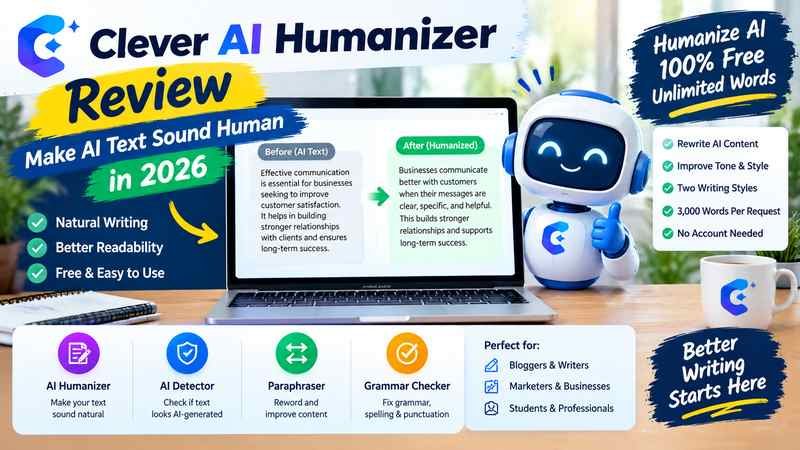
Clever AI Humanizer is a free online writing tool designed to make AI-generated text sound more natural by adjusting sentence structure, tone, phrasing, and readability. It can help polish drafts produced with tools such as ChatGPT, Gemini, and Claude, but its output still needs human review for accuracy, clarity, and meaning.
The tool is worth considering if you want to improve a stiff blog post, make a business email sound less mechanical, or give a first draft a more natural rhythm without rewriting every sentence yourself. Its main appeal is accessibility: the official website currently advertises free use, no fixed monthly word allowance, and a limit of 3,000 words per request.
Humanize AI 100% Free, Unlimited words
However, making AI text sound human is not the same as making it accurate, original, or undetectable by AI detectors. Understanding that distinction will help you decide when Clever AI Humanizer is useful and when manual editing is the better option.
What Is Clever AI Humanizer?
Clever AI Humanizer is a browser-based text editing tool that rewrites submitted content to improve its tone, sentence variety, fluency, and readability. Rather than requiring you to edit every sentence manually, it produces a revised draft that you can inspect and refine.
You can use it with AI-assisted blog articles, product descriptions, social media captions, emails, reports, and other forms of everyday writing.
Official website: Clever AI Humanizer.
The service also provides separate tools for AI detection, paraphrasing, and grammar correction. These serve different purposes, so choosing the appropriate tool matters.
| Tool | Main purpose |
| AI Humanizer | Improves tone, phrasing, and readability |
| AI Detector | Estimates whether text resembles AI-generated writing |
| AI Paraphraser | Expresses existing ideas in different words |
| Grammar Checker | Identifies potential grammar, spelling, and punctuation problems |
These tools can complement one another, but none replaces a careful review of the underlying information.
Clever AI Humanizer Features in 2026
The following details reflect the service’s published information available in October 2026. Features, processing limits, and terms may change.
| Feature | Current published details |
| Price | Free |
| Monthly word allowance | No fixed monthly word cap advertised |
| Maximum input per request | 3,000 words |
| Writing styles | Normal and Clear & Structured |
| Supported languages | English, Spanish, and Portuguese |
| Account requirement | Guest access is available |
| Content history | Available to signed in users |
| Additional tools | AI Detector, AI Paraphraser, and Grammar Checker |
Source: Official Clever AI Humanizer website.
Humanize AI 100% Free, Unlimited words
1. Natural tone and sentence variety
Clever AI Humanizer aims to reduce repetitive expressions, overly uniform sentence patterns, and stiff wording. These changes can make an AI assisted draft easier to read.
For example, a generic sentence such as:
Effective communication is essential for businesses seeking to improve customer satisfaction.
Might be revised to something more direct:
Businesses communicate better with customers when their messages are clear, specific, and helpful.
This is an illustrative editing example, not a verified output from the tool. The better version depends on the intended audience and context.
2. Two writing styles
The official website lists two main options.
Normal
Best suited to blog posts, social media copy, product descriptions, and conversational content. Choose it when you want writing to feel approachable without becoming overly formal.
Clear & Structured
Intended for reports, summaries, and other organized writing. It may be a more suitable starting point when clarity and logical presentation matter more than conversational warmth.
Neither style is automatically best for every document. Review the result against the expectations of your audience rather than assuming that a selected style will produce the right voice.
Humanize AI 100% Free, Unlimited words
3. A 3,000 word input limit
Clever AI Humanizer currently accepts up to 3,000 words in one request. Longer articles therefore need to be divided into sections.
This is manageable for short blog posts, emails, and product descriptions. For a lengthy report or a complete article, however, processing separate sections can create inconsistencies in terminology, transitions, and tone.
After editing separate sections, read the complete document from beginning to end. A paragraph that sounds natural by itself might not connect smoothly to the paragraph that follows.
4. Free access without a fixed monthly word allowance
The official site advertises a price of $0 and no fixed monthly word allowance. It also states that processing remains subject to service availability. The terms allow the provider to change features and usage limits, so free access should not be treated as an unconditional guarantee of uninterrupted service.
Humanize AI 100% Free, Unlimited words
+1
5. Additional writing tools
The wider Clever AI Tools service includes an AI detector, paraphraser, and grammar checker.
These tools address different editing needs. A paraphraser changes how an idea is expressed, a grammar checker identifies language errors, and an AI detector estimates whether text resembles AI generated writing.
A detector score is not proof of who wrote a document. Similarly, passing a grammar check does not establish that an article is factually correct.
How to Use Clever AI Humanizer Step by Step
The process is straightforward. The more important part is deciding what should be changed and checking the result afterward.
Step 1: Open the official website
Visit cleverhumanizer.ai in your browser. Guest access is available, so you can begin without creating an account.
Step 2: Paste your draft
Copy your existing text into the input field. Start with a passage whose meaning you understand and whose factual claims you can verify.
Step 3: Choose a writing style
Select Normal for more conversational material or Clear & Structured for reports and organized explanations.
Step 4: Generate the revised version
Select the humanization option and allow the service to process your text. Availability and response time may vary.
Step 5: Review before using it
Compare the revised text with your original. Check facts, names, dates, quotations, links, keyword placement, and any important qualifications before publishing or submitting it.
The last step is essential. Automated rewriting should produce a draft for review, not an unquestioned replacement for your original.
Does Clever AI Humanizer Actually Work?
It can improve readability, but the quality of the result depends on the original text and the changes made. It is more useful as an editing assistant than as a substitute for writing judgment.
Its effectiveness depends on what you expect it to accomplish.
| Goal | What to expect |
| Reduce repetitive wording | A reasonable use case |
| Improve sentence flow | Potentially useful, subject to review |
| Make an email sound warmer | A suitable editing task |
| Preserve every technical detail | Must be checked manually |
| Improve weak arguments | Not guaranteed |
| Correct inaccurate information | Not a reliable substitute for fact checking |
| Guarantee a human sounding result | No guarantee |
| Guarantee that AI detectors will not flag the text | No guarantee |
Independent reviews published in 2026 report differing results from AI detection tests. Some describe lower AI detection scores after rewriting, while others report that particular detectors continued to classify the output as AI generated. Those findings are not directly comparable because the text samples, detector versions, and testing methods differ.
Walter Writes AI
+2
The practical conclusion is that you should judge the tool primarily by the quality of its writing, not by a single detector score.
Why a humanizer may produce better writing
AI generated drafts can become repetitive when they rely on familiar introductory phrases, predictable transitions, or sentences with similar structures. Rewriting can help vary those patterns and make the prose more direct.
Consider a hypothetical product description:
Before editing
“This product offers a wide range of useful features. It is designed to help users improve productivity. It also provides a convenient way to manage everyday tasks.”
After a manual editorial revision
“This product brings everyday tasks into one place, helping users spend less time managing their workflow.”
The revised version is shorter and more specific. However, the improvement comes from removing repetition and sharpening the message, not from making the text appear human at any cost.
A rewriting tool may achieve a similar result, but it can also introduce unnecessary wording or remove details that matter. That is why human review remains part of the process.
Can Clever AI Humanizer Bypass AI Detectors?
No reliable guarantee exists that Clever AI Humanizer will bypass every AI detector.
AI detectors estimate patterns associated with generated text. Different systems can assess the same passage differently, and rewriting may change those results without establishing who actually authored the content.
For instance, a passage might receive a low AI probability score from one detector and a high score from another. Neither result, by itself, establishes authorship with certainty.
Three distinctions matter:
- Natural sounding writing: The prose reads smoothly and fits the audience.
- Detector classification: A particular system estimates whether the text resembles AI generated content.
- Authentic authorship: The work reflects the actual contributions of the person or people responsible for it.
These are separate questions. Improving the first does not guarantee a particular result on the second, and neither establishes the third.
If you are a student, follow your institution’s AI policy. If you are a freelancer, follow the client’s disclosure requirements. If you publish articles professionally, prioritize original reporting, reliable evidence, useful explanations, and meaningful editorial judgment.
CleverFiles’ current terms also prohibit using its services to interfere with or manipulate automated classifiers and prohibit submitting AI altered text in violation of applicable academic disclosure or integrity rules.
Clever AI Humanizer
Is Clever AI Humanizer Good for SEO Content?
Clever AI Humanizer can help refine SEO articles by reducing repetitive phrasing and improving readability. It should not be treated as a complete SEO writing system.
A strong search focused article needs much more than natural sounding sentences. It must answer the reader’s question, provide reliable information, explain relevant details, and offer enough value to justify its place in search results.
Google’s published guidance states that generative AI can assist with research and content structure, but generating large quantities of pages without adding value can violate its scaled content abuse policy. The central concern is the quality and purpose of the content, not simply whether AI was involved.
Google for Developers
+1
A practical workflow for SEO writers
- Research the topic first. Establish search intent, identify trustworthy sources, and gather facts before drafting.
- Write or generate an initial draft. Organize the article around the reader’s actual questions instead of filling space with related keywords.
- Use Clever AI Humanizer selectively. Apply it to passages that feel repetitive, stiff, or unnecessarily formal.
- Verify the revised content. Check figures, citations, product claims, names, dates, and statements that could change in meaning during rewriting.
- Restore the article’s purpose and voice. Make sure the revised copy still answers the search intent, preserves relevant keywords naturally, and reflects your editorial standards.
- Perform a final human edit. Remove filler, repeated explanations, unsupported claims, and generic sentences that add no useful information.
One detail deserves special attention: do not assume that a humanizer will preserve SEO elements perfectly. Review the primary keyword, important supporting phrases, headings, internal links, and factual context after rewriting.
For example, changing the wording of a sentence that contains a target phrase may be harmless, but deleting a product name or altering a technical specification could weaken the article’s usefulness.
Advantages and Limitations of Clever AI Humanizer
The strongest reason to use Clever AI Humanizer is its accessible editing workflow. Its limitations become more apparent when you expect it to handle complex editorial decisions independently.
| Advantages | Limitations |
| Free access according to the official site | Processing availability is not guaranteed |
| No fixed monthly word allowance advertised | Maximum 3,000 words per request |
| Two writing styles for different purposes | Limited published style choices |
| Can help improve repetitive or stiff prose | May require substantial manual editing |
| Works through a browser | Requires an internet connection |
| Additional grammar and paraphrasing tools | Does not replace comprehensive fact checking |
| Guest access is available | Privacy and content handling require consideration |
These tradeoffs make the tool more appropriate for routine editing than for documents that demand strict factual precision, confidential handling, or highly distinctive writing.
Who should use it?
Good fit
- Bloggers who need a first pass on repetitive drafts.
- Freelance writers who want to improve sentence flow.
- Marketers polishing product descriptions or social media copy.
- Professionals editing routine emails and reports.
- Content teams that already have a fact checking and editorial review process.
Less suitable
- People who expect a guaranteed detector result.
- Writers who need research, citations, and fact verification performed automatically.
- Professionals handling confidential client material.
- Students attempting to conceal prohibited AI use.
- Publishers who intend to generate articles in bulk without adding meaningful value.
For complex writing, an experienced editor may deliver more value than repeated automated rewrites because an editor can evaluate argument quality, audience expectations, evidence, and context together.
Is Clever AI Humanizer Safe to Use?
Safety depends partly on what you submit and how comfortable you are with the provider’s data practices.
The current privacy policy, effective September 30, 2026, says submitted text is sent to external AI model providers for processing. It also states that content is not used to train or fine tune AI models, but submitted text and outputs may be used for debugging, automated evaluation, and quality checks in which authorized staff may read samples. The policy specifies a 30 day retention period for submitted text and output, subject to stated exceptions.
Clever AI Humanizer
Guest users receive different treatment: the policy says the first 100 characters of submitted text and associated technical information are retained for two days, and the rest of the submitted text and its result are not stored under that guest record.
Clever AI Humanizer
These details are worth checking before using the service, particularly if you work with client documents or business information.
Practical precautions include:
- Do not submit passwords, financial records, identity documents, or confidential business information.
- Remove personal information that is not needed for the editing task.
- Review the latest privacy policy and terms before using the service.
- Follow your employer’s or client’s requirements for external AI tools.
- Keep a copy of the original draft when editing important documents.
A free service can still involve data processing. Price alone does not determine whether a tool is appropriate for sensitive work.
Clever AI Humanizer vs. Manual Editing
Choosing between automated rewriting and manual editing depends on the quality of the draft and the consequences of getting something wrong.
| Consideration | Clever AI Humanizer | Manual editing |
| Speed | Can automate an initial rewrite | Depends on the editor and document |
| Sentence variety | Can suggest alternative phrasing | Can make more deliberate stylistic choices |
| Fact verification | Requires separate checking | Can be incorporated into the editing process |
| Voice and nuance | May need correction | Allows more precise control |
| Technical accuracy | Needs careful review | Better suited to context sensitive decisions when the editor has relevant knowledge |
| Cost | Official site currently advertises free use | Depends on whether you edit yourself or hire someone |
The most practical approach is often a combination. Use automation for repetitive language problems, then apply human judgment to meaning, evidence, and tone.
If the draft is already strong, manual editing may be quicker than processing it through a tool and then repairing unwanted changes. If the draft is readable but mechanically repetitive, automated rewriting may be worth trying.
Tips for Getting Better Results
You can improve the quality of the final document by making the task more focused.
- Start with a sound draft. A humanizer cannot reliably repair weak reasoning, missing evidence, or an unclear argument.
- Process manageable sections. Shorter passages make it easier to identify changes that affect meaning.
- Choose the style according to the audience. Conversational copy and formal reports have different requirements.
- Compare the original and revised versions. Look for deleted details, exaggerated claims, and changes in tone.
- Protect important terminology. Product names, technical language, citations, and required keywords may need to remain unchanged.
- Avoid endless rewriting. Repeated passes can make good writing wordier or less distinctive.
- Read the result aloud. Awkward transitions and unnatural phrasing often become easier to spot.
- Make the final decisions yourself. Keep useful edits, reject unnecessary ones, and verify factual statements against the original sources.
A useful rule is to stop rewriting when the passage communicates its point clearly, sounds appropriate for its audience, and preserves its factual meaning. More rewriting does not automatically produce better writing.
Frequently Asked Questions
Is Clever AI Humanizer completely free in 2026?
The official website currently advertises the service as free, with no fixed monthly word allowance and a maximum of 3,000 words per request. The provider’s terms also state that features and usage limits may change, and availability is not guaranteed.
Humanize AI 100% Free, Unlimited words
+1
Do I need to create an account?
No. The official website supports guest use. Signing in provides access to content history, according to the service’s published information.
Humanize AI 100% Free, Unlimited words
Can Clever AI Humanizer rewrite text from ChatGPT or Gemini?
Yes. You can paste text generated by ChatGPT, Gemini, Claude, or another writing assistant into the editor. The quality of the revised result depends on the input and the editing requirements.
Does Clever AI Humanizer preserve the original meaning?
It is designed to improve writing while retaining the intended meaning, but that outcome is not guaranteed. Check every revised passage for altered claims, missing details, incorrect figures, or changed qualifications.
Can Clever AI Humanizer make content undetectable?
No. It cannot guarantee that a detector will classify a passage as human written. Detector results vary by system and sample, and a score does not establish authorship.
Is Clever AI Humanizer suitable for academic writing?
It may help with permitted language editing, but students must follow their institution’s rules for AI assistance and disclosure. The provider’s terms prohibit using the service to violate applicable academic integrity requirements.
Clever AI Humanizer
Does Clever AI Humanizer help with Google rankings?
It may improve readability, but using a humanizer does not guarantee higher rankings. Search performance depends on the usefulness, accuracy, relevance, and overall quality of a page. Google’s guidance warns against scaled content production that adds little or no value for users.
Google for Developers
+1
Is Clever AI Humanizer better than a paraphrasing tool?
They have different primary purposes. A humanizer focuses on tone and readability, while a paraphraser focuses on expressing the same idea in different words. Both can change meaning unintentionally, so the output should be reviewed.
Is it safe to paste private documents into Clever AI Humanizer?
Avoid submitting highly sensitive or confidential material. The published privacy policy allows submitted content to be processed by external AI providers and used for specified testing and quality purposes. Read the current policy before uploading documents containing information that should remain private.
Clever AI Humanizer
Final Verdict
Clever AI Humanizer is a practical option for writers who want to improve stiff, repetitive AI assisted drafts without paying for a rewriting tool. Its free access, straightforward interface, two writing styles, and additional language tools make it worth considering for routine editing.
Its value depends on how you use it. It can help refine sentences, but it cannot guarantee factual accuracy, preserve every nuance, establish genuine authorship, or ensure that a detector will not flag the result.
For bloggers, marketers, and professionals, the strongest workflow is to use Clever AI Humanizer as an editing assistant, then verify the information, restore the intended voice, and make the final editorial decisions yourself. The objective should be better writing that serves the reader, not merely text that looks different from its original draft.
You may also read:Gemini AI