
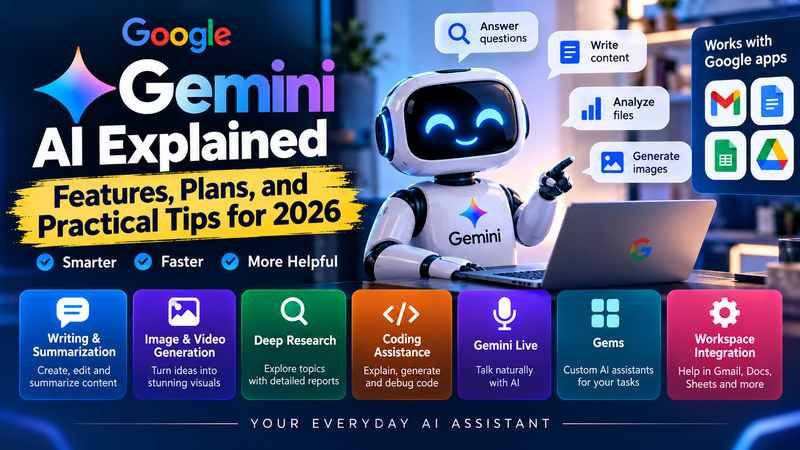
Gemini AI is Google’s artificial intelligence assistant for answering questions, writing content, analyzing files, researching topics, generating images, and helping people work across Google’s apps. In 2026, it has grown beyond a simple chatbot into a broader collection of AI models, creative tools, research features, and productivity services.
The important distinction is that Gemini is both an AI assistant and a wider ecosystem of models and tools. You can use the Gemini app for everyday tasks, access AI assistance in supported Google services, or work with Gemini models through developer tools. The features available to you depend on your account, subscription, country, and the particular tool you use.
This guide explains what Gemini AI does, which features are useful, how its subscription plans compare, and how to get better results without wasting time or money.
What Is Gemini AI?
Gemini AI is Google’s family of artificial intelligence models and user-facing services. It can interpret and generate text, work with supported images and files, assist with coding, summarize information, and handle certain audio and video tasks.
It is designed to understand more than text alone. Depending on the model and feature, you can combine written instructions with documents, pictures, and other supported media to give the assistant more context.
For example, you could ask Gemini to summarize a lengthy report, explain a difficult scientific concept in simple language, draft a professional email, or help troubleshoot a programming error.
Gemini is available through several routes:
- Gemini app: A conversational assistant for questions, writing, learning, planning, and creative work.
- Gemini in Google apps: AI assistance integrated into eligible services such as Gmail, Docs, Sheets, and other Workspace products.
- Gemini developer tools: Models and related services available through platforms such as Google AI Studio and the Gemini API.
- AI-powered research and creation tools: Features for deeper research, document analysis, image generation, video creation, and other specialized tasks, subject to availability and plan limits.
You can explore the consumer assistant at Gemini.
How Does Gemini AI Work?
Gemini uses machine learning models trained to recognize patterns in information and generate responses based on the context of a request. It predicts and constructs an answer rather than retrieving a guaranteed correct response from a database.
The interaction usually follows a straightforward process:
- You provide a question, instruction, document, image, or other supported input.
- Gemini interprets the available context and determines how to respond.
- The model generates an answer, analysis, draft, or other output.
- You review the result, correct mistakes, and ask follow-up questions if needed.
Some tasks may involve tools that search for information, analyze files, generate media, or interact with connected services. The exact capabilities depend on the model, feature, and permissions available.
Why Gemini can still make mistakes
Gemini can produce convincing explanations that contain incorrect facts, outdated information, faulty calculations, or invented references. This is sometimes called an AI hallucination.
A well-written response is not proof that the answer is accurate. For important claims, verify information against original documents, official websites, or other trustworthy sources.
This matters especially when using Gemini for academic research, business decisions, financial analysis, technical work, or publishing content. Treat it as an assistant that can accelerate your work, not as an unquestionable authority.
Key Gemini AI Features in 2026
Gemini’s usefulness depends less on the number of features available and more on how well those features fit your daily work. These are the main capabilities worth understanding.
1. Writing, rewriting, and summarization
Gemini can help create first drafts, rewrite awkward sentences, summarize long passages, adjust tone, and organize scattered ideas into a coherent document.
Common uses include:
- Drafting emails, reports, blog posts, and business proposals.
- Rewriting technical material for a general audience.
- Turning meeting notes into action items.
- Summarizing lengthy documents.
- Producing outlines and alternative headlines.
- Checking a draft for clarity, structure, and repetition.
The best results usually come from giving Gemini a clear audience, purpose, tone, and output format. For publishable work, review factual claims and revise the language rather than accepting the first draft unchanged.
2. Multimodal understanding
Gemini can work with multiple types of input, depending on the feature and model. These may include text, images, documents, audio, and video.
For example, you could provide a photograph of a household appliance and ask what its visible controls mean, upload a supported document for analysis, or ask for a summary of a video.
Multimodal support is particularly useful when describing something in words would be difficult. However, visual interpretation can be wrong, and the assistant may miss small details, text, or context. Check important observations against the original material.
3. Deep Research
Deep Research is designed for questions that require more than a quick answer. It can investigate a topic across multiple sources and produce a structured report.
Potential uses include:
- Comparing competing products or services.
- Exploring a business market.
- Gathering background information for an article.
- Identifying trends and competing explanations.
- Building a starting bibliography for further research.
Google describes Deep Research as a tool that browses and analyzes online sources to create research reports. Its access and usage limits depend on the applicable Google AI plan. See the official Google AI plans page.
A useful research report still needs editorial judgment. Check the dates of cited sources, follow important claims to their originals, and distinguish evidence from the model’s interpretation.
4. Image and video generation
Gemini’s creative tools can help turn written ideas and visual references into generated media. Depending on availability, users may be able to create or edit images, work with music generation, or produce video through Google’s supported creative models and services.
Practical applications include:
- Developing concepts for blog illustrations.
- Creating visual ideas for social media.
- Exploring alternative product or campaign designs.
- Turning a rough creative brief into a visual starting point.
- Producing short video concepts for further editing.
Access to particular generation models, output quality, and usage limits varies by plan and region. Generated media may also contain visual inconsistencies, so review the result before publishing it.
5. Coding and technical assistance
Gemini can explain programming concepts, generate example code, suggest debugging steps, review functions, and help developers understand unfamiliar codebases.
A developer might ask it to explain an error message, write a sample Python function, or compare two approaches to a database query.
For stronger results, include the relevant code, the exact error, the expected behavior, and the environment in which the code runs. Ask Gemini to explain its proposed changes and provide tests.
Important: Generated code is not automatically secure or correct. Test it, inspect dependencies, and review permissions and security implications before using it in production.
6. Gemini Live and conversational assistance
Where supported, Gemini Live lets users interact through natural voice conversation rather than relying exclusively on typed prompts. This can make brainstorming, language practice, explanations, and hands-free assistance more convenient.
For example, you could talk through a presentation idea, ask follow-up questions about a concept, or practice a conversation in another language.
Voice features and integrations vary by device, account, language, and location. Spoken answers should be checked just as carefully as written ones.
7. Gems and personalized workflows
Gems let users configure Gemini for recurring tasks by giving it specialized instructions. Instead of repeating the same requirements in every conversation, you can create a reusable assistant for a particular purpose.
Examples include a writing editor, study tutor, brainstorming partner, or coding helper.
A useful Gem should have a clearly defined role, a specific task, explicit constraints, and a consistent output format. For example, a content editor Gem could be instructed to flag unsupported claims, remove repetition, and preserve the writer’s intended meaning.
Google’s Gems help documentation explains how to create and use these customized assistants. Features and account policies can change, so check the current documentation before relying on a specific workflow.
8. Integration with Google Workspace
For people who already use Google services, integration can be one of Gemini’s most practical advantages.
Depending on the plan and availability, Gemini assistance may be offered in services such as:
- Gmail: Help with email drafts and communication.
- Google Docs: Drafting, rewriting, and document refinement.
- Google Sheets: Working with data, formulas, and spreadsheet tasks.
- Google Drive: Finding or analyzing information in supported files.
- Google Search: Access to AI-powered search experiences and research features.
These integrations can reduce the need to copy information between separate tools. However, not every feature is included in every account, and some require a paid plan or a supported language and region. Google’s current plan comparison lists the benefits and restrictions associated with its subscriptions.
Gemini AI Features at a Glance
| Feature | Best use | Main consideration |
| Writing assistance | Drafting, editing, and summarizing | Verify facts and refine the style |
| Image and file analysis | Interpreting supported visual or document inputs | Check details against the original |
| Deep Research | Multi-source research and reports | Verify citations and source quality |
| Image and video generation | Creative concepts and media production | Limits and availability vary |
| Coding assistance | Explaining code and debugging | Test and review generated code |
| Gemini Live | Voice conversations and brainstorming | Depends on device and regional support |
| Gems | Reusable, specialized instructions | Quality depends on setup and review |
| Workspace integration | Working within Google apps | Some integrations require subscriptions |
The table describes general use cases, not a guarantee that every feature is available to every user.
Gemini AI Plans and Pricing in 2026
Gemini offers free access alongside paid Google AI subscriptions. Paid plans generally provide higher usage limits, expanded access to advanced models, additional creative tools, and cloud storage.
The main plans listed by Google are Google AI Plus, Google AI Pro, and Google AI Ultra. The best option depends on how frequently you use Gemini and which features you need.
Google AI plan comparison
The following prices are US reference prices. Your local pricing, taxes, promotions, and available benefits may differ.
| Plan | US reference price | Storage | Best suited for |
| Gemini free access | $0 | 15 GB Google Account storage | Everyday questions and occasional use |
| Google AI Plus | Varies by offer and region | 400 GB | Regular personal productivity |
| Google AI Pro | $19.99/month | 5 TB | Frequent research, writing, and creative work |
| Google AI Ultra | $99.99/month starting price | 20 TB | Heavy AI use and advanced creative or technical workflows |
Google’s official AI plan page provides the current subscription details. Prices and benefits can change, so confirm the amount shown for your account before subscribing.
Free Gemini access
The free option is a sensible starting point for people who want to ask questions, brainstorm, draft content, or explore supported AI features without paying a subscription fee.
Its main advantages are the lack of a subscription cost and the ability to learn how the assistant fits into your workflow before committing to a paid tier.
The tradeoff is that usage limits and access to advanced features can be more restrictive. Google’s published limits can change, and access may depend on testing, account eligibility, and availability.
Best for: Students, casual users, and anyone who uses AI occasionally.
Google AI Plus
Google AI Plus sits between free access and the more expensive subscriptions. It provides increased access to Gemini and selected creative and productivity features, alongside 400 GB of storage in the plan described by Google.
It may be a reasonable upgrade if you frequently reach free usage limits but do not need the broadest access available to advanced users.
Best for: Regular users who want more capacity without paying for the highest tier.
Google AI Pro
Google AI Pro is designed for people who rely on AI regularly for demanding tasks. Google’s US reference price is $19.99 per month, with expanded access to Gemini models and features such as Deep Research, plus integrations and storage benefits.
Depending on availability, its additional benefits can include AI assistance in Google Workspace, expanded creative tools, and developer-oriented services.
The subscription makes more sense when you use several of these benefits consistently. Paying for a higher usage limit alone may not justify the cost if your tasks are simple and infrequent.
Best for: Content professionals, researchers, developers, and users who depend on AI throughout the workday.
Google AI Ultra
Google AI Ultra is the premium option, with a US starting price of $99.99 per month on Google’s current plan page. It offers higher usage limits and additional access to advanced capabilities, including Deep Think and selected agentic or creative tools.
Its value depends on the amount of work you can genuinely accomplish with those extra capabilities. Someone who regularly performs intensive research, complex reasoning, or media production may benefit more than someone who primarily writes emails.
Best for: Advanced users and professionals with sustained, demanding AI workloads.
Which Gemini plan should you choose?
Use your actual workflow to make the decision.
- Choose free access if you are still learning Gemini or use it for straightforward questions.
- Consider AI Plus if you regularly need more capacity but have moderate requirements.
- Choose AI Pro if advanced research, productivity integrations, or creative tools are central to your work.
- Consider AI Ultra if you repeatedly encounter Pro limits or need specific premium capabilities.
One practical rule: upgrade because you need a particular capability or consistently hit a limit, not simply because a higher-priced plan sounds more powerful.
How to Use Gemini AI: A Step-by-Step Guide
Getting started is straightforward. You do not need programming experience to use the consumer Gemini app.
Step 1: Open Gemini
Visit gemini.google.com or install the official Gemini app on a supported device. Sign in with your Google Account if required.
Step 2: Describe your task
Type a question or instruction into the prompt field. Explain what you want, why you need it, and any important restrictions.
Step 3: Review the answer
Read the response and identify missing details, questionable claims, or sections that do not meet your needs.
Step 4: Refine the result
Ask Gemini to revise, explain, shorten, expand, compare, or verify specific parts. Follow-up prompts often produce better results than trying to write one enormous instruction.
Step 5: Apply the output
Copy or transfer the useful material into your document, project, or workflow. Verify important facts and edit the final result before using it.
The interface may look different across web, mobile, and account versions, but the underlying process remains similar.
8 Practical Tips for Getting Better Gemini AI Results
The quality of an AI response depends partly on the model and partly on how clearly you describe the task. These techniques make prompts more useful and outputs easier to evaluate.
1. Give Gemini a specific role and task
Vague instructions encourage generic responses. Instead of asking for help with a blog post, define what kind of help you need.
Weak prompt:
“Write about digital marketing.”
Improved prompt:
“Write an introductory article for small business owners explaining three practical digital marketing strategies. Use plain English, give one realistic example per strategy, and avoid unsupported statistics.”
The second prompt establishes an audience, scope, style, and quality standard.
2. Include the context that matters
Tell Gemini who will use the output, what you already know, and what constraints it must respect.
For example, when asking for a weekly study plan, provide your subjects, available study hours, exam date, and difficult topics. Without that information, the assistant can only produce a generic schedule.
Do not include passwords, confidential business records, or sensitive personal information unless you have a legitimate reason and an appropriate, approved way to handle it.
3. Specify the desired format
If you need a comparison, ask for a table. If you need an action plan, request numbered steps. If you need a short answer, state a word or sentence limit.
You can specify:
- Output format.
- Intended audience.
- Tone and reading level.
- Required sections.
- Length constraints.
- Evidence or citation requirements.
Clear formatting instructions reduce the amount of editing needed afterward.
4. Break complex tasks into stages
A multi-stage workflow often works better than asking Gemini to complete every part of a complicated project in one response.
For an article, for example:
- Identify the audience and search intent.
- Gather and verify relevant evidence.
- Develop the structure.
- Draft the sections.
- Review accuracy, clarity, and repetition.
- Edit the final article.
This approach makes mistakes easier to identify and gives you more control over the result.
5. Ask for sources, then verify them
For factual research, request links to original studies, official documentation, or primary sources wherever possible.
Do not assume a citation exists simply because Gemini provides a convincing title or URL. Open the source and confirm that it supports the specific claim being made.
For time-sensitive topics such as software features, subscription prices, and regulations, check the publication or update date as well.
6. Use follow-up prompts to improve weak answers
You do not have to start again when the first response is mediocre.
Try prompts such as:
- “Explain this for a beginner without losing technical accuracy.”
- “Identify the weakest assumptions in your answer.”
- “Separate verified facts from recommendations.”
- “Remove repetition and preserve the useful details.”
- “List the claims that still need independent verification.”
The goal is not to make Gemini sound more confident. It is to make the output more useful and easier to check.
7. Match the model to the difficulty of the task
Where multiple models or thinking levels are available, use a faster option for routine tasks and a more capable reasoning option for problems that need deeper analysis.
A short email does not usually require the same computational effort as analyzing a lengthy technical report or debugging a complicated program.
Google notes that advanced models and higher thinking levels may consume more of your available usage. Choosing an appropriate level can help you avoid exhausting limits on routine work. See the official Gemini usage and limits documentation.
8. Build reusable prompts for recurring work
If you perform the same task repeatedly, create a standard prompt or a Gem instead of rewriting your instructions each time.
For example, a reusable content-review prompt could ask Gemini to:
- Flag claims without adequate evidence.
- Identify repeated ideas.
- Check whether headings match the content.
- Suggest clearer explanations.
- Preserve the intended audience and tone.
Reusable instructions improve consistency, although they do not eliminate the need to review each result.
Best Gemini AI Use Cases by Audience
Gemini is most valuable when it addresses a recurring task or a clear bottleneck. The following examples show where different users may benefit.
| User type | Useful applications | What to watch |
| Students | Explanations, revision questions, study schedules | Check answers against course material |
| Writers and bloggers | Outlines, editing, research assistance | Verify claims and avoid derivative writing |
| Business owners | Email drafts, planning, document summaries | Review decisions and sensitive information |
| Developers | Code explanations, debugging, sample functions | Test code and inspect security |
| Researchers | Source discovery, synthesis, document analysis | Validate citations and methodology |
| Designers and creators | Visual concepts, image generation, creative briefs | Inspect generated assets for errors |
| Office professionals | Document drafting and spreadsheet assistance | Check formulas, calculations, and permissions |
Gemini AI for students
Students can ask Gemini to explain difficult concepts, generate practice questions, compare ideas, and organize revision schedules.
A particularly useful technique is to request a guided explanation instead of an answer alone. Ask Gemini to explain the reasoning, identify common misconceptions, and give you a similar problem to solve independently.
This supports learning more effectively than copying a finished answer without understanding it.
Gemini AI for SEO and content writing
Gemini can assist with topic research, content briefs, heading structures, draft editing, and the identification of questions an article should answer.
However, a fluent article is not necessarily a useful or authoritative one. Writers should independently verify facts, evaluate sources, and add meaningful explanations rather than simply generating large amounts of text.
For SEO, the priority should remain satisfying the reader’s intent and producing accurate, original content. Repeating keywords or publishing unreviewed AI drafts does not guarantee search visibility.
Gemini AI for businesses
Businesses can use Gemini to draft communications, summarize documents, brainstorm campaigns, and explore operational problems.
The main consideration is data governance. Before uploading customer information, contracts, internal documents, or other sensitive material, review the terms, account settings, and applicable organizational policies for the specific product you use.
A personal consumer account should not automatically be treated as an approved environment for confidential company information.
Gemini AI vs. ChatGPT: What Is the Difference?
Gemini and ChatGPT are both general-purpose AI assistants, but their strongest practical fit depends on the tools, integrations, and models available in the specific plans you compare.
| Consideration | Gemini | ChatGPT |
| Google ecosystem | Direct connection to supported Google services and features | Can connect with supported services and tools, depending on the plan |
| Research | Offers research features such as Deep Research where available | Offers research capabilities through supported tools and plans |
| Writing and reasoning | Supports drafting, analysis, and problem-solving | Supports drafting, analysis, and problem-solving |
| Media generation | Offers supported image, video, and other creative capabilities | Offers supported image and other media capabilities |
| Developer use | Gemini API, AI Studio, and related developer tools | OpenAI API and supported coding tools |
| Subscription choice | Google AI plans with tier-specific benefits | ChatGPT plans with tier-specific benefits |
Neither assistant is automatically better for every task. Features, usage limits, model quality, and pricing change over time, so compare the exact plans rather than relying on broad brand claims.
If you already work heavily in Google Workspace, Gemini’s integrations may be particularly convenient. If you need a specific set of tools, compare their availability and performance directly before choosing a subscription.
Limitations and Risks of Gemini AI
Gemini can save time, but understanding its limitations is necessary if you want reliable results.
Incorrect or misleading information
Gemini may misunderstand a question, produce incorrect facts, or present uncertain information confidently. Verify important claims, especially those that affect money, health, legal obligations, safety, or professional decisions.
Privacy and data handling
Your responsibilities depend on the account type, product, and applicable terms. Review Google’s privacy information and the relevant product settings before sharing sensitive data.
Avoid uploading information that you do not have permission to disclose.
Usage limits and subscription changes
Paid subscriptions do not necessarily provide unlimited access. Google may apply limits based on the plan, model, task complexity, and feature used. Model names and access conditions can also change.
Check the current plan documentation if a particular capability is essential to your workflow.
Regional and device restrictions
Some features are restricted by country, language, age, account type, or device. A feature shown in a product announcement may not be available to every user immediately.
Check the eligibility requirements before paying for a plan primarily to access a specific feature.
Copyright and originality
AI-generated content can resemble existing material or contain inaccurate descriptions of sources. Review text and media before publication, and make sure you have the rights and permissions needed for your intended use.
For professional publishing, independent research and meaningful human editing remain important.
Frequently Asked Questions About Gemini AI
Is Gemini AI free to use?
Yes, Gemini offers free access, although available models, usage limits, and features may be restricted. Paid Google AI plans offer expanded access and additional benefits. Check the current Google AI plan comparison for the options available in your region.
Is Gemini AI better than ChatGPT?
Neither is universally better. Gemini may suit users who rely on Google services and its associated AI tools, while ChatGPT may better fit users whose preferred workflow depends on its particular models and features. Compare the specific capabilities you need.
Can Gemini AI generate images?
Yes, Gemini supports image generation and editing capabilities through eligible models and tools. Access, limits, and supported functions vary by plan and region.
Can Gemini AI analyze PDF files?
Gemini supports file uploads and document analysis in eligible experiences. You can use it to summarize a PDF, extract key ideas, or ask questions about its contents. Check numerical details and important quotations against the original file.
Can Gemini AI help with coding?
Yes. Gemini can explain programming concepts, generate sample code, suggest debugging approaches, and assist with technical analysis. Generated code should be tested and reviewed before use.
Does Gemini AI have a mobile app?
Yes. Gemini is available through supported mobile apps and the web. Availability and individual features depend on your device, account, language, and region.
Is Gemini AI safe to use?
Gemini can be useful when used with appropriate safeguards, but it is not error-free. Verify important answers, protect sensitive information, review permissions, and avoid relying on generated content alone for high-stakes decisions.
Which Gemini AI plan is best for beginners?
Free access is generally the best starting point. Learn how Gemini handles your everyday tasks before deciding whether higher limits or premium features would justify a subscription.
What is the difference between Gemini Flash and Gemini Pro?
In Google’s model lineup described in its documentation, Flash models emphasize a balance of speed and capability, while Pro is designed for more demanding reasoning, mathematics, coding, and complex analysis. Exact model versions and access conditions can change. Consult the official Gemini model and usage guide for current details.
Final Thoughts
Gemini AI is best understood as a flexible assistant rather than a tool that automatically produces finished, reliable work. It can help you write, research, analyze files, create media, learn new concepts, and work more efficiently within supported Google services.
Start with a real task you want to improve. Learn how to write clear prompts, check the output, and build repeatable workflows. Upgrade only when you need additional access or a specific paid capability.
The biggest benefit comes from combining Gemini’s speed with your own judgment. Let it handle useful parts of the work, verify what matters, and remain responsible for the final result.
You may also read:Creatify AI Review